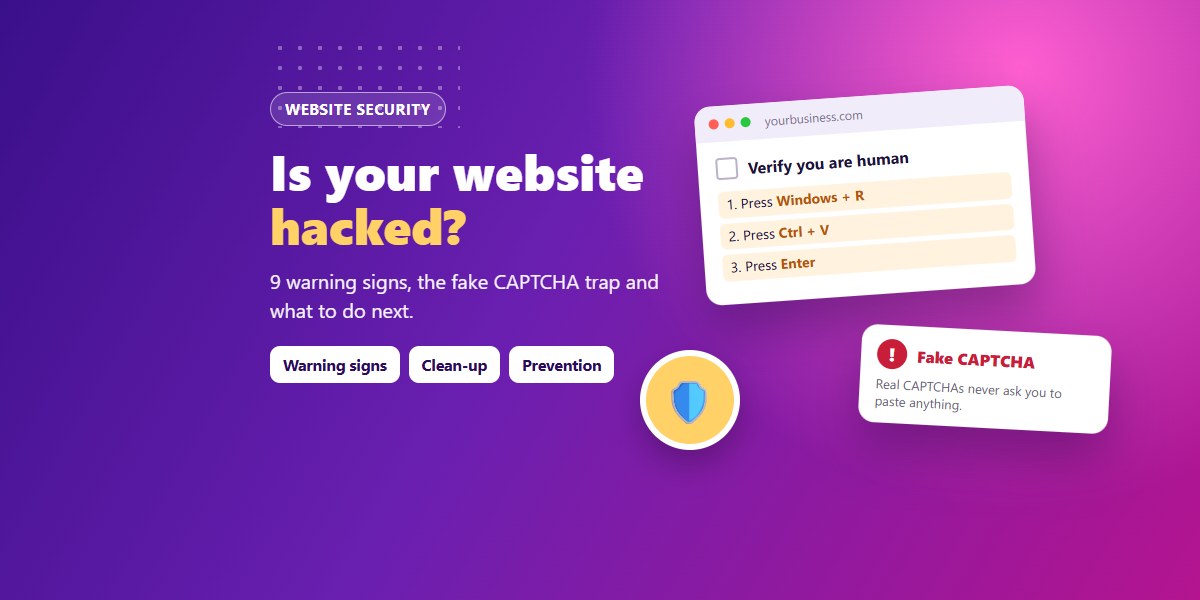
Most small business owners find out their website was hacked from a customer: "Sir, your site is asking me to press Windows + R and paste something", or "Google is showing a red warning on your website". By then the damage has usually been running for days or weeks: your visitors are being targeted, Google may be warning people away, and your enquiries quietly stop.
We clean and secure hacked websites for businesses in Coimbatore and across Tamil Nadu. This guide explains the warning signs we see most often, the new fake CAPTCHA ("ClickFix") attack that is hitting many WordPress sites, and exactly what to do, in the right order, if your site is affected.
9 warning signs your website has been hacked
| What you notice | What it usually means |
|---|---|
| A "Verify you are human" box that asks visitors to press Windows + R or paste a command | A fake CAPTCHA (ClickFix) script has been injected into your site. It tries to make visitors run malware on their own computer. |
| Visitors are sent to betting, pharmacy, dating or "you won a prize" pages | Hidden redirect code. It often fires only on mobile, only for visitors coming from Google, or only once per visitor, so you may not see it yourself. |
| Google shows "This site may be hacked" or Chrome shows a red "Dangerous site" screen | Google has detected malware or spam on your pages. |
Searching site:yourdomain.com on Google shows Japanese, Chinese or spam pages you never made | Thousands of spam pages were added to rank for other people's keywords ("Japanese keyword hack"). |
| Admin users you don't recognise in WordPress | The attacker created a back door to come back later. |
New plugins, or files with random names, especially .php files inside the uploads folder | Web shells or malware files that let the attacker control the site. |
| Your hosting company suspends the site or warns about spam emails | Your server is being used to send spam or attack other sites. |
| The site suddenly became very slow, or the hosting bill / resource usage jumped | Hidden scripts running in the background, such as spam mailers or crypto miners. |
| Contact form enquiries stopped, but traffic looks normal | Forms changed to send leads somewhere else, or visitors are being redirected before they reach the form. |
Even one of these is enough reason to check your site properly. Don't wait for a second sign.
The fake CAPTCHA (ClickFix) attack, explained simply
This is one of the most common website infections right now, and it is dangerous because it uses your trusted website to attack your customers.
- The attacker gets into the website, usually through an outdated plugin or theme, a "nulled" (pirated) premium plugin, or a stolen admin password.
- They add a small script that shows a realistic "I'm not a robot" check to visitors.
- Instead of clicking pictures, the box tells the visitor to press Windows + R, then Ctrl + V, then Enter. The page has already copied a hidden command to their clipboard.
- If the visitor follows the steps, that command downloads malware that can steal saved passwords, banking details and WhatsApp Web sessions.
Remember: a real CAPTCHA never asks you to open the Run box, PowerShell or Terminal, or to paste anything. If you ever see this on any website, close the tab. If you see it on your website, treat it as an emergency.
What to do if your website is hacked: step by step
- Don't delete things in a panic. Deleting random files can break the site and destroy the clues needed to find how the attacker got in.
- Put the site in maintenance mode (or ask your hosting provider to) so customers stop being targeted while it is cleaned.
- Take a full backup of the infected site (files and database) and keep it separately. You may need it to compare files or to recover content.
- Change every password: hosting / cPanel, FTP, database, every WordPress admin, and the email accounts linked to them. Turn on two-factor login wherever it is offered.
- Remove unknown admin users and check that every remaining user really needs admin rights.
- Find and remove the malware: replace WordPress core files with fresh copies, reinstall plugins and themes from their official sources, remove unknown files (especially
.phpfiles in uploads), and check.htaccess,wp-config.phpand the database for injected scripts. - Close the door they used: update everything, and delete nulled or abandoned plugins and themes. If you skip this step, the hack usually comes back within days.
- Check Google Search Console → Security issues. After cleaning, request a review so the warning is removed from Google results.
- Tell your customers if needed. If visitors may have run the fake CAPTCHA command, a short, honest message advising them to run an antivirus scan and change passwords protects your reputation.
Cleaning a hacked site properly takes experience. A half-cleaned site often looks fine to the owner while still attacking visitors. If you are not sure, get it checked by someone who does this regularly.
How to stop it from happening again
- Keep WordPress, plugins and themes updated, at least every month. Most hacks we clean came through an old plugin.
- Never use nulled (pirated) themes or plugins. Many of them come with a back door already inside.
- Use fewer plugins. Every plugin you install is more code that has to be kept updated.
- Strong, unique passwords and two-factor login for WordPress and hosting.
- Automatic off-site backups (not only on the same server), so you can restore a clean copy quickly.
- Give admin access only to people who need it, and remove old developers' and staff accounts.
- Monitor your site: Google Search Console alerts, uptime checks and a security plugin or firewall.
- Consider a lighter platform if you don't need WordPress's plugin ecosystem. A custom CMS with no third-party plugins has far fewer doors to break into. (Read: WordPress or a custom CMS?)
How Sivani Tech can help
We clean hacked WordPress and PHP websites, find how the attacker got in, close that gap, and set up updates, backups and monitoring so it doesn't happen again. We also handle the Google Search Console review so the warning disappears from search results.
Think your site may be infected? Call or WhatsApp +91 78110 44144 or send us a message. Tell us your website address and what you noticed, and we will check it.
Frequently asked questions
How do I know if my WordPress site is hacked?
Look for strange redirects, a "verify you are human" box asking you to press Windows + R, unknown admin users, new plugins you didn't install, spam pages in Google results (search site:yourdomain.com) or a security warning in Google Search Console.
Why does my website redirect to spam sites only on mobile?
Many hacks hide from the site owner. They redirect only mobile visitors, only people arriving from Google, or only first-time visitors, so the owner, who opens the site directly on a computer, sees nothing wrong.
Is it safe to follow the steps in a "verify you are human" box?
Not if it asks you to press Windows + R, open PowerShell or Terminal, or paste anything. Real CAPTCHAs never do that. Close the page.
Will restoring an old backup fix a hacked website?
Only if the backup is from before the infection, and only if you also change passwords and fix the weakness the attacker used. Otherwise the site is usually hacked again.
How long does Google take to remove the "This site may be hacked" warning?
After the site is cleaned and you request a review in Search Console, Google usually re-checks it within a few days, sometimes longer.
Can a small business website really be a target?
Yes. Most attacks are automated: bots scan millions of sites for known weaknesses, whatever the size of the business. A small site with an outdated plugin is an easy target.
Want this for your business?
Talk to Sivani Tech - free consultation, clear quote, local Coimbatore team.